
Gaming Routers: Everything You Need to Know for Faster, Smoother Online Gaming
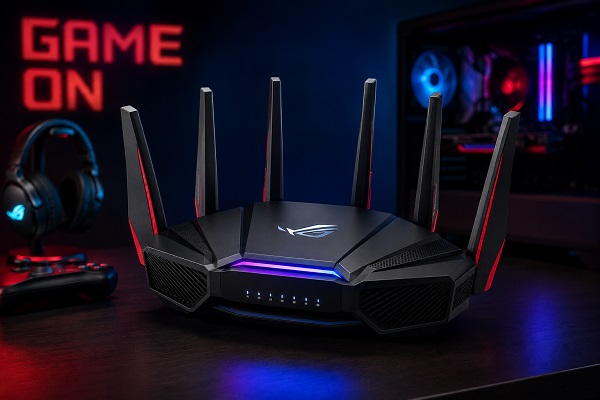
Whether you're battling opponents in fast-paced shooters, exploring vast multiplayer worlds, or streaming your gameplay live, a stable internet connection is just as important as a powerful gaming PC or console. This is where gaming routers come into play. Designed specifically to reduce lag, prioritize gaming traffic, and deliver consistent speeds, gaming routers can significantly enhance your online gaming experience.
In this guide, we'll explore what gaming routers are, how they work, their key features, benefits, and tips for choosing the best one for your gaming setup.
What Is a Gaming Router?
A gaming router is a high-performance Wi-Fi router engineered to optimize network traffic for online gaming. Unlike standard routers, gaming routers include specialized hardware and software that reduce latency, minimize packet loss, and prioritize gaming devices over other connected gadgets.
These routers ensure that activities such as video streaming, file downloads, or smart home devices don't interfere with your online gaming sessions.
Why Do Gamers Need a Gaming Router?
Online games require a fast and stable internet connection with low latency. A regular router may struggle when multiple devices are connected simultaneously, leading to lag spikes, delayed responses, and poor gaming performance.
A gaming router helps by:
Reducing latency (ping)
Prioritizing gaming traffic
Delivering stable Wi-Fi coverage
Managing multiple connected devices efficiently
Providing faster wired and wireless speeds
Key Features of Gaming Routers
1. Quality of Service (QoS)
Quality of Service allows you to prioritize gaming traffic over other internet activities. This means your online game receives bandwidth first, even if someone else in the house is streaming movies or downloading large files.
2. Low Latency Optimization
Gaming routers are designed to minimize latency, ensuring your commands reach the game server as quickly as possible.
3. Wi-Fi 6 and Wi-Fi 7 Support
Modern gaming routers support the latest wireless standards, offering:
Faster speeds
Better performance with multiple devices
Lower latency
Improved network efficiency
4. Multi-Gig Ethernet Ports
Many gaming routers include 2.5Gbps or even 10Gbps Ethernet ports, providing ultra-fast wired connections for gaming PCs and consoles.
5. Dual-Band or Tri-Band Connectivity
Gaming routers often feature:
2.4GHz band for smart devices
5GHz band for gaming
Additional 5GHz or 6GHz band for heavy network traffic
This reduces congestion and improves performance.
6. Powerful Processors
Gaming routers use multi-core processors and larger RAM capacities to handle heavy network loads without slowing down.
7. Advanced Security
Most premium gaming routers include:
WPA3 encryption
Firewall protection
VPN support
Malware blocking
Parental controls
Benefits of Using a Gaming Router
Lower Ping
Lower ping means faster communication between your device and the game server, resulting in quicker response times.
Reduced Lag
Gaming routers prioritize your gaming packets, reducing interruptions caused by other connected devices.
Better Streaming
If you're a content creator, gaming routers can handle gaming and live streaming simultaneously without affecting performance.
Improved Wi-Fi Coverage
High-performance antennas and beamforming technology provide stronger signals across larger homes.
Support for Multiple Devices
Gaming routers are designed for households where many devices connect at the same time, ensuring everyone enjoys stable internet access.
Wired vs Wireless Gaming
Wired Connection
Pros:
Lowest latency
Most stable connection
Faster download speeds
Cons:
Requires Ethernet cables
Wireless Connection
Pros:
More flexibility
Easy setup
Great for mobile gaming
Cons:
Slightly higher latency
Can be affected by interference
Whenever possible, competitive gamers should use a wired Ethernet connection for the best experience.
How to Choose the Best Gaming Router
Consider the following factors before purchasing:
Internet Speed
Choose a router capable of handling your ISP's maximum speed.
Wi-Fi Standard
Opt for Wi-Fi 6 or Wi-Fi 7 for future-proof performance.
Number of Devices
Larger households require routers with better multi-device handling capabilities.
Coverage Area
Large homes may benefit from mesh-compatible gaming routers.
Ethernet Ports
Look for multiple Gigabit or Multi-Gig LAN ports if you connect several gaming devices.
Gaming Features
Useful features include:
Adaptive QoS
Gaming Mode
VPN acceleration
Traffic Analyzer
Device prioritization
Mobile app management
Tips to Improve Gaming Performance
Use Ethernet whenever possible.
Keep router firmware updated.
Position the router in a central, elevated location.
Use the 5GHz or 6GHz band for gaming.
Limit background downloads while gaming.
Enable QoS settings.
Restart the router periodically.
Avoid placing the router near microwaves or thick concrete walls.
Are Gaming Routers Worth It?
If you frequently play competitive online games, stream gameplay, or live in a home with multiple internet users, a gaming router can noticeably improve your experience. Reduced lag, faster response times, and better traffic management make gaming routers a valuable upgrade for serious gamers.
However, casual gamers with a fast internet connection and minimal network congestion may find that a high-quality standard Wi-Fi 6 router is sufficient.
Final Thoughts
A gaming router is more than just a faster Wi-Fi device—it's a network optimization tool designed to deliver smooth, responsive, and uninterrupted gameplay. With advanced technologies like Quality of Service, Wi-Fi 6/7, multi-gig Ethernet, and intelligent traffic management, gaming routers help reduce lag and ensure your gaming sessions remain competitive and enjoyable.
Whether you're gaming on a PC, PlayStation, Xbox, Nintendo Switch, or a mobile device, investing in the right gaming router can make a noticeable difference in your overall online experience.