
Why Some Laptop Keyboards Feel Better for Long Typing Sessions
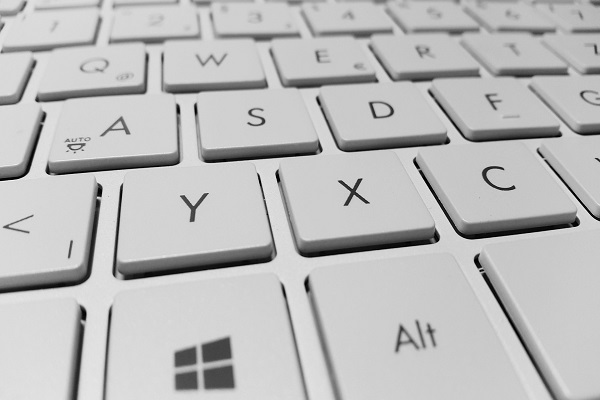
A laptop keyboard can look perfectly ordinary, yet two laptops can feel completely different when used for long periods of typing. One may feel comfortable and natural, while another can leave your fingers feeling tired after the same amount of work.
The difference is often hidden in small design details such as key spacing, key travel, layout, feedback and the overall structure of the keyboard.
Key Travel Can Change the Typing Experience
Key travel refers to how far a key moves when it is pressed. Some laptop keyboards have very shallow keys, while others offer a little more movement.
A small amount of travel can give each keystroke a clearer physical response. This can make typing feel more controlled, particularly when someone is writing for long periods.
Very shallow keys are not necessarily bad, but they can feel different depending on a person's typing style and preference.
Key Spacing Matters More Than It Looks
The distance between keys can affect typing accuracy.
When keys are positioned with enough space between them, fingers can move naturally from one key to another. Poorly spaced or cramped layouts may increase accidental presses, especially during fast typing.
This is one reason a keyboard that looks compact and attractive may not always be the most comfortable for extended writing.
The Shape of the Keys Can Help
Laptop keys are not always completely flat. Some have slightly curved or textured surfaces that help the fingers identify where each key is.
Subtle differences in key shape can make it easier to locate keys without constantly looking down. Over a long typing session, these small improvements can make the keyboard feel more natural.
Tactile Feedback Makes Each Press Easier to Understand
A good keyboard usually provides some feedback when a key is pressed.
That feedback can come from the physical movement of the key and the resistance felt by the finger. When the response is clear, a typist may not need to press each key harder than necessary.
A keyboard that feels too soft or vague can make typing less predictable, while overly stiff keys may become tiring during extended use.
Keyboard Layout Makes a Big Difference
Two laptops can have similar-sized keyboards but completely different layouts.
The position and size of commonly used keys such as Enter, Shift, Backspace and the arrow keys can influence how quickly someone adapts to the keyboard.
A familiar and logically arranged layout can reduce unnecessary finger movement and make everyday typing easier.
The Keyboard Deck Should Feel Stable
The area underneath the keyboard matters too.
If the keyboard deck flexes noticeably when keys are pressed, the whole typing experience can feel less solid. A firm surface provides a more consistent base for the hands and fingers.
This is particularly noticeable during faster typing, when multiple keys are being pressed frequently.
Key Resistance Can Affect Fatigue
Every key requires a certain amount of force to press. A keyboard with very light keys can feel effortless for some users, while others may prefer slightly firmer feedback.
The important factor is consistency. When keys require a similar amount of pressure, the fingers can develop a predictable rhythm instead of constantly adjusting to different levels of resistance.
The Wrist Position Also Matters
Even a well-designed keyboard cannot completely compensate for an awkward working position.
If the laptop is placed too low, too high or too far away, the wrists may remain in an uncomfortable position for extended periods.
Keeping the keyboard at a comfortable distance and maintaining a relaxed hand position can make a bigger difference than small changes in key design alone.
Keycaps With Good Surface Texture Can Help
The surface of a key can influence how the fingers interact with it.
A slightly textured surface can provide better contact than an extremely smooth one. This may make it easier to maintain finger position during long typing sessions.
It is a subtle feature, but small tactile details often become more noticeable after hours of use.
Backlighting Is More Than an Appearance Feature
Keyboard backlighting is primarily useful for visibility in darker environments.
Being able to clearly see the keys can reduce the need to search for letters or symbols, particularly when working at night. Some keyboards also allow brightness levels to be adjusted according to the surrounding light.
However, backlighting itself does not make a keyboard comfortable. It is simply one factor in the overall experience.
Why Personal Preference Still Matters
There is no single keyboard design that feels perfect for everyone.
Someone who types quickly may prefer stronger tactile feedback, while another person may prefer softer and quieter keys. People with larger hands may appreciate more spacing, while those who travel frequently may prioritise a compact design.
The best laptop keyboard is therefore not necessarily the one with the most impressive specifications. It is the one that matches the way the user actually types.
Small Design Choices Can Matter Over Time
Laptop keyboards are made up of dozens of small design decisions. Key travel, spacing, layout, resistance, surface texture and structural stability all combine to create the final typing experience.
These details may not be obvious when looking at a laptop in a shop or reading its specifications, but they become much more noticeable after hours of writing, working or studying.
For anyone who spends a large part of the day typing, keyboard comfort deserves the same attention as the laptop's processor, display and battery. A keyboard that feels natural can make everyday work easier without adding another complicated feature to the machine.