
How to Protect Your Gadgets from Power Surges
Electronic gadgets have become an essential part of everyday life. Smartphones, laptops, televisions, gaming consoles, smart home devices and other electronics help us work, communicate and stay entertained. However, sudden changes in electrical voltage can damage these devices, interrupt their functioning and sometimes lead to expensive repairs or replacements.
A power surge is a brief increase in electrical voltage above the normal level. It can occur because of lightning, electrical grid switching, faulty wiring or the operation of certain electrical equipment. Although not every surge causes visible damage, repeated smaller surges can also affect sensitive electronic components over time.
Understanding how power surges occur and taking a few preventive measures can help protect your gadgets and extend their useful life.
1. Use a Good-Quality Surge Protector
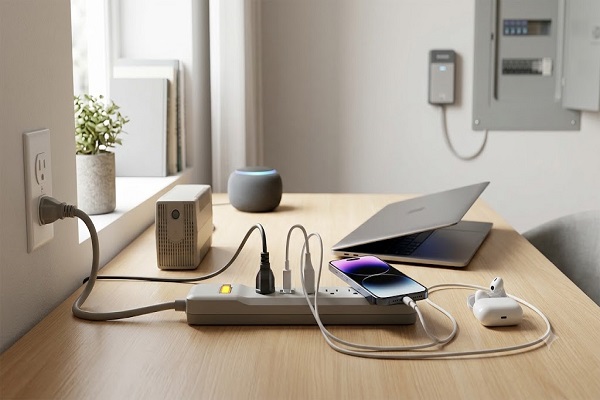
One of the simplest ways to protect electronic equipment is to use a surge protector. Unlike a basic extension board, a surge protector is designed to limit excess voltage and divert surge energy away from connected equipment.
When choosing one, check its rated surge protection capacity, safety certifications applicable in India, warranty conditions and suitability for your devices. A reputable product should clearly identify its protection features rather than making vague claims.
Remember that surge protectors have limitations. They cannot prevent every type of electrical damage, and their protective components can wear out after repeated surges. Replace a damaged unit or one that indicates its protection function has failed.
2. Choose the Right Protection for Expensive Electronics
Different gadgets may require different levels of protection. A laptop, television, desktop computer or gaming system may benefit from a suitable surge-protected power connection.
For particularly valuable equipment, consider the manufacturer's electrical recommendations and consult a qualified electrician if you are unsure about your home's wiring or protection requirements.
Do not assume that every extension board, multiplug adapter or power strip offers surge protection. Check the product specifications carefully before purchasing it.
3. Unplug Devices During Severe Electrical Storms
Lightning can cause dangerous electrical surges that travel through power lines. During a severe thunderstorm, disconnecting vulnerable electronics from the mains can provide additional protection.
If it is safe to do so, unplug sensitive equipment before the storm becomes severe. Avoid handling plugs or electrical equipment during active lightning, especially when there is water, dampness or a risk of electrical contact.
Unplugging a device from its power connection may not protect it against surges entering through connected Ethernet, telephone, antenna or other wired connections. Follow the manufacturer's guidance for protecting these connections as well.
4. Install Proper Earthing and Electrical Protection
Correct earthing, also called grounding, is an important part of household electrical safety. It helps provide a safe path for fault current and allows appropriate protective devices to operate as intended.
If your home has frequent electrical fluctuations, damaged sockets, loose connections or unexplained appliance failures, arrange an inspection by a qualified electrician.
Depending on your installation, a professional may recommend suitable protective devices, such as surge protective devices at the electrical distribution board. Their selection and installation should match the wiring system and applicable electrical standards.
Never attempt to modify household wiring yourself if you are not qualified to do so.
5. Use a UPS for Computers and Essential Equipment
An uninterruptible power supply (UPS) provides temporary battery power when the electricity supply fails. Many UPS models also include some level of voltage regulation or surge protection, although the features vary by product.
A UPS can help prevent sudden shutdowns and give you time to save your work. This is especially useful for desktop computers, networking equipment and other devices that should not lose power unexpectedly.
Before buying one, check its capacity, battery backup duration, output type and surge protection specifications. Do not assume that every UPS provides complete protection against lightning or all electrical surges.
6. Be Careful When Charging Smartphones and Tablets
Smartphones and tablets are frequently connected to chargers, making charger quality an important consideration.
Use compatible chargers and cables from reputable manufacturers. Avoid damaged cables, loose adapters and suspiciously cheap accessories that lack clear safety information.
If you notice unusual heat, burning smells, buzzing sounds or visible damage around a charger or socket, stop using it and disconnect the power only if it is safe to do so. Have the equipment checked or replaced before using it again.
A normal phone charger is not necessarily a dedicated surge protection device, so do not rely on it as your only safeguard against electrical surges.
7. Avoid Overloading Electrical Sockets
Connecting too many high-power appliances to one outlet or extension board can cause overheating and increase electrical risks.
Check the rated current and power capacity of sockets, power strips and adapters. Avoid connecting multiple high-power appliances through a chain of extension boards.
Devices such as heaters, kettles and other high-wattage appliances should be connected according to their manufacturer's instructions and the capacity of the electrical circuit.
Keeping electrical connections in good condition can reduce the risk of overheating and other electrical faults, even though it does not eliminate every possible power surge.
8. Protect Your Television and Smart Home Devices
Modern televisions, streaming devices, Wi-Fi routers and smart home equipment contain sensitive electronic components. These devices can be affected by electrical disturbances entering through their power supply or connected cables.
Use appropriate surge protection for your entertainment and networking equipment. Keep cables and adapters in good condition, and follow the installation guidance supplied with each device.
For equipment connected to outdoor antennas or external data lines, ask a qualified installer about suitable protection for those connections.
9. Understand Voltage Stabilizers and Surge Protectors
Voltage stabilizers and surge protectors serve related but different purposes.
A voltage stabilizer is designed to maintain its output voltage within a specified range when the incoming supply varies. A surge protector is designed to limit brief voltage spikes. Some products combine multiple protective functions, but not all do.
Before buying either product, identify the problem you are trying to address. If your area experiences frequent low or high voltage, a suitable stabilizer may be useful for compatible equipment. If brief voltage spikes are the concern, look for a product specifically rated for surge protection.
Neither device should be assumed to provide complete protection from a direct lightning strike.
10. Inspect and Replace Damaged Accessories
Power strips, chargers, cables and electrical sockets can deteriorate with use. Damaged insulation, loose connections, scorch marks or unusual smells are warning signs that equipment needs attention.
Inspect your accessories periodically and replace damaged items instead of continuing to use them. Keep electrical connections away from water and avoid placing cables where they may be crushed, bent sharply or exposed to excessive heat.
Follow the manufacturer's replacement recommendations for surge protectors and other protective equipment.
11. Back Up Important Digital Data
Surge protection reduces certain electrical risks, but it cannot guarantee that every gadget will remain undamaged. A sudden failure may still result in lost files or interrupted work.
Back up important photographs, documents and other digital files to a reliable cloud service or an external storage device. For valuable work files, consider maintaining more than one backup.
Disconnect external storage devices when they are not needed, particularly if they are connected to equipment in an area with frequent electrical disturbances. Keep at least one backup separate from the main device so that a single incident does not affect every copy.
12. Know What to Do After a Power Surge
If your gadgets stop working following a power fluctuation, avoid repeatedly switching them on and off to test whether they have recovered.
First, check for obvious external issues, such as a tripped circuit breaker, only if it is safe to do so. Do not touch damaged wiring, exposed conductors or equipment showing signs of overheating.
If a device has a burning smell, visible damage, unusual noise or excessive heat, disconnect it from the power supply only when safe and arrange professional inspection. Do not open power supplies, chargers or other mains-powered equipment yourself.
If several appliances fail at the same time, have the electrical installation checked before reconnecting valuable electronics.
Conclusion
Protecting gadgets from power surges begins with understanding electrical risks and using suitable protective equipment. Quality surge protectors, proper earthing, safe charging practices and professional inspection of household wiring can help reduce the risk of electrical damage.
A UPS may provide additional protection against power interruptions, while regular equipment checks and reliable data backups offer further peace of mind. Because no single device can eliminate every electrical hazard, combining appropriate protection with safe electrical practices is the most sensible approach.
By taking these precautions, you can help protect your electronics, reduce avoidable repair costs and keep your essential devices working reliably for longer.