
How to Choose a Computer Mouse
A computer mouse is an important accessory for everyday computing, gaming, office work, and creative tasks. With so many options available, choosing the right mouse can be confusing. The best choice depends on how you use your computer, your comfort preferences, and your budget.
1. Consider Your Primary Use
Start by deciding what you will mainly use the mouse for. Office work and browsing usually require a comfortable and reliable mouse, while gaming may require higher precision, programmable buttons, and faster response times. Designers and professionals may prefer a mouse with additional controls and precise tracking.
2. Wired vs Wireless
Wired mice connect directly through USB and generally provide a reliable connection without requiring batteries. They can be a practical choice for desktop users and gamers.
Wireless mice provide a cleaner setup and greater freedom of movement. They may connect through Bluetooth or a USB receiver. If you choose a wireless model, consider battery life and charging options.
3. Choose the Right Size and Shape
Comfort is one of the most important factors. A mouse that is too small or too large can become uncomfortable during long hours of use. Consider the size of your hand and how you naturally hold the mouse.
Common grip styles include palm grip, claw grip, and fingertip grip. Try to choose a shape that feels natural and provides adequate support.
4. Check the Sensor
The sensor determines how accurately the mouse tracks movement. Optical sensors are commonly used and work well for everyday computing. Gaming and professional users may benefit from a mouse with a more advanced and precise sensor.
5. Understand DPI
DPI, or dots per inch, indicates how sensitive the mouse is to movement. A higher DPI means the cursor can move farther with less physical movement.
For regular office work, extremely high DPI may not be necessary. Gamers and creative professionals may prefer adjustable DPI so they can change sensitivity according to the task.
6. Look at the Buttons
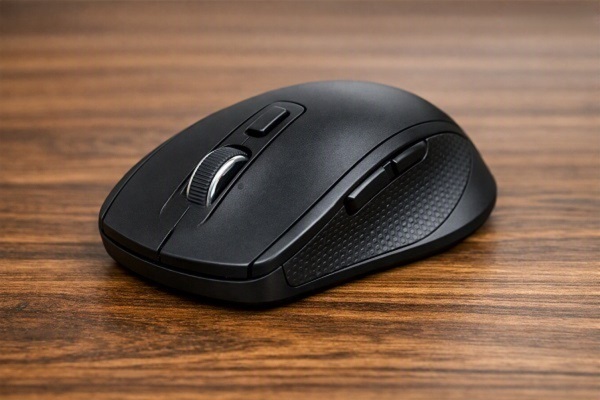
A basic mouse usually has left and right buttons along with a scroll wheel. Some models include additional programmable buttons.
Extra buttons can be useful for gaming, editing, productivity shortcuts, and navigating frequently used applications. However, more buttons are not always better if you do not need them.
7. Consider Ergonomics
If you spend several hours working on a computer, ergonomics should be a priority. Look for a mouse that allows your hand and wrist to remain in a comfortable, natural position.
An ergonomic design can make extended computer use more comfortable.
8. Check the Weight
Mouse weight is largely a matter of personal preference. Lightweight mice are easy to move quickly, while heavier mice may feel more stable.
Gaming mice sometimes offer adjustable weights, allowing users to customise the feel according to their preferences.
9. Think About Battery Life
For wireless mice, battery life is an important consideration. A mouse with longer battery life requires less frequent charging or battery replacement.
Rechargeable models can be convenient for regular users, while replaceable-battery models can continue working quickly after a battery change.
10. Set a Realistic Budget
Computer mice are available across a wide range of prices. You do not necessarily need an expensive model for everyday work.
Focus on comfort, reliability, sensor quality, connectivity, and features that match your needs rather than simply choosing the most expensive option.
Final Thoughts
Choosing the right computer mouse is mainly about finding a balance between comfort, functionality, precision, and price. For everyday users, a comfortable and reliable mouse may be enough, while gamers and professionals may benefit from advanced sensors, adjustable DPI, programmable buttons, and customisable designs. Taking your usage habits into account can help you choose a mouse that remains comfortable and useful for years.