

How NVMe SSDs Work
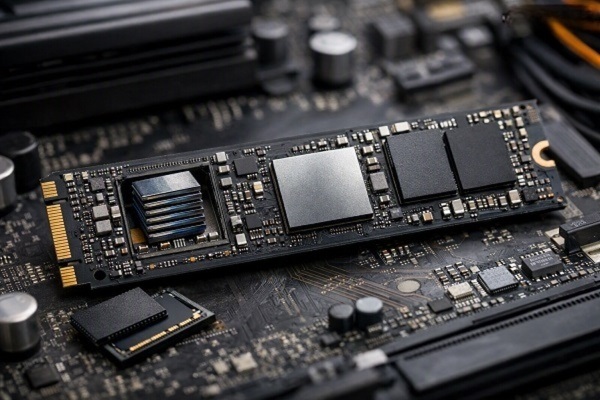
NVMe SSDs have become common in modern laptops, desktops, and gaming PCs because they can transfer data much faster than traditional hard drives and older SSD technologies. But what exactly is NVMe, and how does an NVMe SSD work?
Understanding the basics can help you choose the right storage device and make better decisions when upgrading a computer.
What Is an NVMe SSD?
NVMe stands for **Non-Volatile Memory Express**. It is a communication protocol designed specifically for high-speed storage devices that use flash memory.
An NVMe SSD stores data on NAND flash memory chips. Unlike a traditional hard disk drive, it has no spinning disks or moving read/write heads.
The important difference is that NVMe allows the SSD to communicate with a computer using the **PCIe interface**, which provides much higher bandwidth than older storage interfaces.
How Does an NVMe SSD Store Data?
An NVMe SSD stores information electronically inside NAND flash memory cells.
These cells can hold electrical charges representing data. The SSD's controller manages where information is stored, retrieves it when needed, and performs background tasks such as error correction and wear management.
Because there are no mechanical moving parts, an SSD can access data very quickly.
How NVMe Connects to the Computer
Most modern NVMe SSDs connect through **PCIe lanes** on the motherboard.
PCIe is a high-speed connection used by components such as graphics cards and storage devices. An NVMe SSD can use multiple PCIe lanes to move large amounts of data between the drive and the processor or memory system.
Newer PCIe generations can provide considerably more bandwidth than older generations, allowing compatible NVMe SSDs to reach higher performance levels.
The Role of the NVMe Controller
The controller is one of the most important parts of an NVMe SSD.
It acts as a bridge between the computer and the NAND flash memory. When the operating system requests a file, the controller identifies where the required data is located and retrieves it from the appropriate memory cells.
The controller also handles important functions such as error correction, wear leveling, garbage collection, and managing the flash memory.
Why NVMe SSDs Are Fast
One major reason NVMe SSDs are fast is their efficient communication protocol.
Older storage technologies were originally designed around the limitations of mechanical hard drives. NVMe was designed for modern flash storage and can handle many commands simultaneously.
NVMe also supports large numbers of queues and commands, allowing computers to process multiple storage requests efficiently.
NVMe SSD vs SATA SSD
Both NVMe and SATA SSDs use flash memory, but their interfaces and protocols are different.
SATA SSDs generally connect through the SATA interface, while NVMe SSDs typically use PCIe.
For many everyday tasks, both can feel much faster than a traditional hard drive. However, NVMe drives can offer substantially higher sequential and random performance, especially when handling large files or demanding workloads.
What Does Sequential Speed Mean?
Sequential read and write speeds describe how quickly a drive can process large blocks of data in a continuous sequence.
For example, copying a large video file can involve sequential data transfer.
NVMe SSDs are particularly capable in these high-throughput workloads because PCIe provides greater bandwidth.
What Does Random Performance Mean?
Random performance refers to accessing smaller pieces of data stored in different locations.
This matters for activities such as launching applications, loading files, and handling multiple tasks simultaneously.
An SSD's random performance can have a noticeable effect on system responsiveness, although the actual experience also depends on the processor, software, and other system components.
Different PCIe Generations
NVMe SSDs can use different generations of PCIe, such as PCIe 3.0, PCIe 4.0, and PCIe 5.0.
Newer generations generally provide more bandwidth per lane. However, an SSD's performance also depends on its controller, NAND memory, thermal design, and the device it is installed in.
A PCIe 5.0 SSD, for example, requires appropriate motherboard and CPU support to take full advantage of its interface capabilities.
Why NVMe SSDs Can Get Hot
Higher performance can also mean higher power consumption and heat generation.
Some high-speed NVMe SSDs can become warm during sustained workloads such as large file transfers or video editing. Many systems use motherboard heatsinks or dedicated SSD cooling to help manage temperatures.
Keeping temperatures under control can help maintain consistent performance during demanding workloads.
Do NVMe SSDs Make a Computer Faster?
An NVMe SSD can significantly improve storage-related performance compared with a traditional hard drive.
Boot times, application launches, file transfers, and other storage-intensive tasks can become much quicker.
However, upgrading to a faster SSD does not automatically make every computer task faster. CPU performance, RAM, software optimization, and other hardware components still matter.
How to Choose an NVMe SSD
When buying an NVMe SSD, look beyond the advertised read speed.
Consider its capacity, PCIe generation, endurance rating, controller, NAND type, warranty, sustained performance, and cooling requirements.
For everyday computing, gaming, and general productivity, a reliable drive with sufficient capacity can be more useful than simply choosing the drive with the highest headline speed.
Final Thoughts
NVMe SSDs work by combining NAND flash memory with a high-speed PCIe connection and a protocol designed for modern solid-state storage.
Their ability to handle many commands efficiently and take advantage of PCIe bandwidth makes them a powerful storage option for modern computers.
For most users, the biggest practical benefits are faster system responsiveness, quicker file transfers, and improved performance in storage-intensive applications.