
Ultrabooks vs Gaming Laptops: Which Is Better?
Choosing the right laptop today isn’t just about picking a brand — it’s about finding the perfect balance between performance, portability, battery life, and price. Two of the most talked-about categories are ultrabooks and gaming laptops. Both have their strengths and target audiences, but which one is better for you? Let’s dive in.
What’s the Difference?
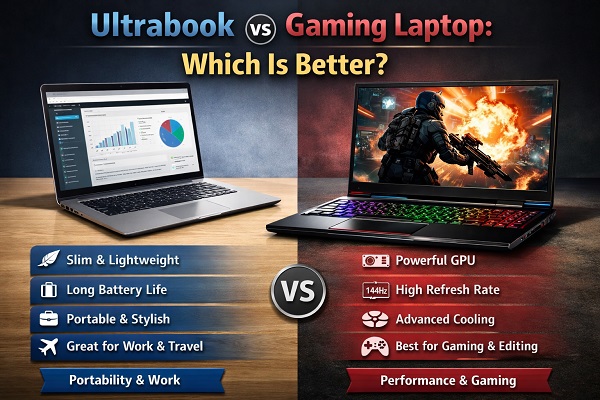
Ultrabooks — Sleek Powerhouses
Ultrabooks are thin, light, and designed for everyday productivity, travel, and professional use. They focus on:
Portability
Long battery life
Fast performance for work and multitasking
Premium build quality
These laptops are ideal for students, professionals, frequent travelers, and anyone who values convenience without sacrificing capability.
Gaming Laptops — Raw Performance Machines
Gaming laptops, on the other hand, are built for high-intensity graphics and performance. They’re designed to:
Run demanding games smoothly
Handle video editing, 3D modeling, and creative software
Deliver high refresh rates and superior cooling
These machines are heavier and bulkier — but they’re powerhouses under the hood.
Performance Showdown
1. CPU & GPU
Ultrabooks: Typically use integrated graphics or mid-range mobile GPUs. Excellent for productivity, light photo/video editing, and casual gaming.
Gaming Laptops: Feature dedicated GPUs (like NVIDIA RTX or AMD RX series) and powerful CPUs. Exceptional for AAA games and heavy creative workloads.
Winner (Performance): Gaming Laptops
Portability & Design
Ultrabooks:
Thin and lightweight — often under 1.5 kg
Sleek, premium aesthetics
Easy to carry in backpacks or briefcases
Gaming Laptops:
Larger chassis for cooling and performance parts
Heavier, usually 2–3 kg or more
More aggressive designs with RGB lighting
Winner (Portability): Ultrabooks
Battery Life
Ultrabooks often win hands down here. With energy-efficient CPUs and optimized power management, many ultrabooks can last 8–12+ hours on a single charge — perfect for all-day use without plugging in.
Gaming laptops, due to their power-hungry components, typically offer 3–5 hours of battery life, even when just browsing or working.
Winner (Battery Life): Ultrabooks
Gaming & Graphics
If gaming is a priority, there’s no contest. Gaming laptops come with dedicated GPUs that handle high-resolution gaming, ray tracing, and high-frame-rate experiences. These systems also support advanced cooling systems and display options like 144 Hz or higher refresh rates.
Ultrabooks are fine for casual or older games, but they’re limited when it comes to heavy AAA titles.
Winner (Gaming & Graphics): Gaming Laptops
Everyday Use & Productivity
For everyday tasks — web browsing, office apps, video streaming, light editing, coding — ultrabooks shine. Their fast SSDs, efficient processors, and long battery life make them ideal for both work and play.
Gaming laptops can do all of this too, but they’re often heavier and less efficient for simple tasks.
Winner (Productivity): Ultrabooks
Cost Considerations
Ultrabooks: Generally mid-to-premium price range due to design and portability. However, they offer great value for their use case.
Gaming Laptops: Tend to be more expensive because of high-end GPUs and cooling systems. If you want top-tier performance, expect to pay more.
Final Verdict
Pick an Ultrabook if:
You need a lightweight, portable machine
You’re a student or professional
Long battery life matters
Your work focuses on productivity and light creative tasks
Pick a Gaming Laptop if:
You want serious gaming performance
You run heavy graphics or creative software
Portability is not a priority
You enjoy immersive displays and high refresh rates
Ultimately, “better” depends on your individual needs. If mobility and everyday efficiency are your priorities — go ultra. But if gaming and hardcore performance are your goals — nothing beats a dedicated gaming laptop.