
Most Useful Gadgets for Students and Working Professionals in 2026
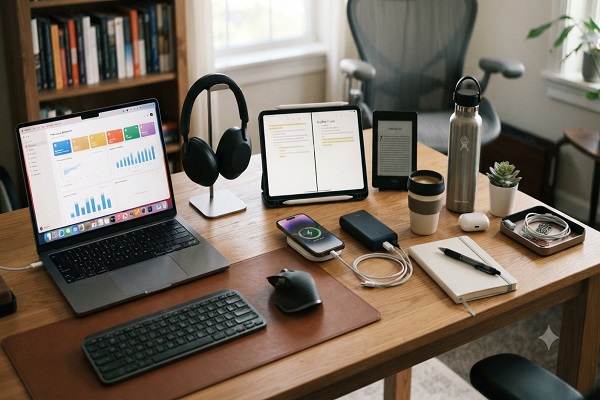
Technology has become an essential part of education and professional life. From attending online classes and completing assignments to managing office tasks and participating in virtual meetings, people increasingly depend on digital devices to improve their productivity and save time.
Today, a wide range of gadgets is available to make everyday activities easier, more convenient and more efficient. Students can use technology to organise their studies, access learning resources and improve concentration, while working professionals can benefit from devices that support communication, time management and remote working.
Whether you are studying at school or college, working from home or managing office responsibilities, choosing the right gadgets can make a significant difference. Here are some of the most useful gadgets for students and working professionals in 2026.
1. Laptops for Learning and Professional Work
A laptop is one of the most important gadgets for students and working professionals. It supports multiple activities, including online learning, research, presentations, document creation, video conferencing and professional projects.
Students can use laptops to attend virtual classes, prepare assignments, create presentations and access educational platforms. Professionals can use them for office applications, communication, data management and remote work.
Before purchasing a laptop, consider the following features:
A fast and reliable processor.
At least 8GB RAM for everyday tasks.
SSD storage for faster performance.
Good battery life.
A comfortable keyboard and clear display.
Choosing a laptop according to your requirements and budget can provide long-term value.
2. Wireless Earbuds for Online Classes and Meetings
Wireless earbuds are useful for attending online lectures, participating in virtual meetings and listening to educational content without disturbing others.
Many modern earbuds offer features such as noise cancellation, built-in microphones, touch controls and long battery life.
They are particularly useful for students who attend online classes and professionals who regularly participate in conference calls.
When choosing wireless earbuds, look for comfortable fitting, good microphone quality, reliable connectivity and battery performance.
3. Smartwatches for Time Management
Smartwatches are more than just fashionable accessories. They can help students and professionals manage their daily schedules and stay connected.
Depending on the model, smartwatches provide notifications, alarms, reminders, calendar updates, fitness tracking and activity monitoring.
Students can use reminders to manage study schedules, while working professionals can receive important notifications without repeatedly checking their smartphones.
Some smartwatches also offer sleep tracking and heart-rate monitoring features.
4. Power Banks for Uninterrupted Connectivity
A power bank is an essential accessory for people who frequently travel, attend classes or work outside their homes.
It provides additional battery power for smartphones, wireless earbuds and other compatible devices when access to an electrical outlet is limited.
Students can use power banks during long college days, while professionals can rely on them during business trips and outdoor meetings.
Important features to consider include:
Battery capacity.
Fast-charging support.
USB Type-C compatibility.
Multiple charging ports.
Safety and temperature protection features.
Always choose a power bank compatible with your device and its charging requirements.
5. Tablets for Digital Notes and Reading
Tablets offer a convenient alternative to traditional notebooks and can be particularly useful for students and professionals who regularly read documents or take notes.
Students can use tablets to access e-books, highlight study materials, attend online classes and write digital notes using a compatible stylus.
Working professionals can use them to review presentations, read reports, manage documents and participate in video conferences.
Some tablets also support detachable keyboards, allowing users to perform basic productivity tasks.
6. Wireless Keyboard and Mouse for Comfortable Working
A wireless keyboard and mouse can improve the comfort and convenience of working on laptops and desktop computers.
They help reduce cable clutter and provide greater flexibility when arranging a workspace.
Students who spend considerable time typing assignments and professionals who regularly prepare reports, spreadsheets or presentations can benefit from these accessories.
Look for an ergonomic design, comfortable keys, responsive controls and reliable wireless connectivity.
7. External SSDs and Pen Drives for Data Storage
Managing digital files is important for both education and professional work. External storage devices provide additional space for saving documents, photographs, presentations, videos and important project files.
External SSDs offer faster data transfer speeds than traditional hard drives in many cases, making them useful for transferring large files.
Pen drives are another affordable option for storing and sharing smaller documents.
Before buying a storage device, check its capacity, transfer speed, compatibility and durability. It is also important to maintain separate backups of important files rather than depending on a single storage device.
8. Portable Monitors for Multitasking
Portable monitors are becoming useful accessories for students and professionals who need additional screen space.
They can connect to compatible laptops and other devices, allowing users to work with multiple windows simultaneously.
Students can use an additional display to refer to study materials while preparing notes. Professionals can use it for spreadsheets, presentations, coding, research and video meetings.
When choosing a portable monitor, consider screen size, resolution, weight, connectivity options and power requirements.
9. Smart Speakers for Voice Assistance
Smart speakers can make everyday tasks more convenient through voice-controlled assistance.
Depending on the device and available services, users can set alarms, check weather updates, play music, create reminders and control compatible smart home devices.
Students can use them to manage study reminders and listen to educational audio content, while professionals can use voice commands to organise simple daily activities.
However, users should review privacy settings and microphone controls before connecting smart speakers to their home networks.
10. Laptop Stands for Better Workspace Comfort
A laptop stand is a simple yet useful accessory for people who spend several hours working or studying on computers.
It raises the laptop screen closer to eye level and can help create a more comfortable working position when combined with an external keyboard and mouse.
Students can use laptop stands for online classes and assignments, while professionals can use them to organise their home office desks.
Choose a stable, adjustable stand with proper ventilation to help prevent unnecessary heat buildup.
11. Noise-Cancelling Headphones for Better Focus
Noise-cancelling headphones can help users reduce distractions in noisy environments.
They are particularly useful for students studying in shared spaces, professionals working from home and employees who frequently travel.
Active noise cancellation uses technology to reduce certain surrounding sounds, while passive noise isolation depends on the physical design of the headphones.
Before purchasing, consider sound quality, comfort, microphone performance, battery life and connectivity.
12. Smart Pens for Digital Note-Taking
Smart pens offer an interesting combination of traditional writing and digital technology.
Depending on the model, they can record handwritten notes digitally, convert handwriting into editable text or synchronise written content with compatible applications.
Students can use them to organise lecture notes, while professionals can use them during meetings, brainstorming sessions and planning activities.
Check device compatibility, supported applications and subscription requirements before purchasing a smart pen.
How to Choose the Right Gadgets on a Budget
Buying every new gadget is not necessary to improve productivity. The best approach is to identify your daily requirements and invest in devices that offer practical benefits.
Here are some useful purchasing tips:
Identify your needs: Choose gadgets based on your studies, profession and daily activities.
Set a budget: Decide how much you can comfortably spend before shopping.
Compare specifications: Check performance, battery life, storage and connectivity.
Read customer reviews: Look for feedback about durability and real-world performance.
Check compatibility: Ensure that accessories work with your existing devices.
Prioritise quality: Choose reliable products with suitable warranties and after-sales support.
Students may benefit from prioritising laptops, earbuds and power banks, while professionals may find portable monitors, wireless accessories and external storage more useful.
Conclusion
Modern gadgets have made education and professional work more accessible, organised and convenient. From laptops and tablets to smartwatches, wireless earbuds and portable monitors, the right technology can help students learn effectively and enable working professionals to manage their responsibilities more efficiently.
However, purchasing expensive devices does not automatically guarantee better productivity. Understanding your requirements, comparing available options and choosing practical gadgets within your budget are more important.
As technology continues to evolve in 2026, selecting useful and reliable gadgets can help students and working professionals stay connected, organised and prepared for the demands of modern life.