
Best USB-C Accessories for Everyday Use: Essential Gadgets to Make Life Easier
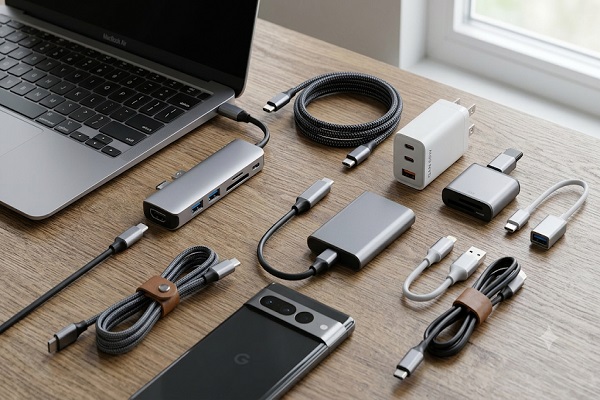
USB-C has become one of the most widely used connectivity standards in modern electronic devices. From smartphones and laptops to tablets, wireless earbuds and gaming accessories, USB-C offers convenient charging, faster data transfer and versatile connectivity through a single port.
As more manufacturers adopt USB-C technology, having the right accessories can make everyday digital activities easier and more efficient. Whether you work from home, travel frequently, attend online meetings or use multiple electronic devices, USB-C accessories can help improve your overall experience.
Here are some of the best USB-C accessories worth considering for everyday use.
1. USB-C Fast Charging Adapter
A USB-C fast charging adapter is one of the most essential accessories for modern electronic devices. It can charge compatible smartphones, tablets and laptops more efficiently than many traditional low-power adapters.
When purchasing a charger, check its wattage, charging standards and device compatibility. Technologies such as USB Power Delivery (USB-PD) allow compatible devices to receive suitable charging power.
A compact multi-port charger can also reduce the need to carry separate adapters for different devices.
2. USB-C to USB-C Charging Cable
A good-quality USB-C cable is useful for charging smartphones, tablets, laptops and other compatible gadgets. It can also support data transfer between devices.
However, not all USB-C cables offer the same performance. Some are designed mainly for charging, while others support faster data transfer and higher power delivery.
Before buying one, check its supported charging wattage, data transfer speed and build quality. A durable braided cable can be a practical option for regular use.
3. USB-C Hub
A USB-C hub is particularly useful for laptop users who need additional connectivity options. Many modern laptops have fewer built-in ports, making it difficult to connect multiple accessories simultaneously.
A USB-C hub can provide additional ports, including USB-A, HDMI, SD card readers and Ethernet connections. Some models also support USB-C Power Delivery, allowing users to charge their laptops while connecting other devices.
It is a useful accessory for office professionals, students and people working with multiple screens.
4. USB-C Power Bank
A USB-C power bank provides portable charging when access to a wall socket is limited. It is especially useful during travel, outdoor activities and long working days.
Many modern power banks support USB-C Power Delivery, which can offer faster charging for compatible smartphones and tablets. Higher-capacity models may also charge selected laptops.
When choosing a power bank, consider its battery capacity, output wattage, charging speed, weight and safety certifications.
5. USB-C to HDMI Adapter
A USB-C to HDMI adapter makes it easier to connect compatible laptops, tablets and smartphones to external displays, televisions or projectors.
It is useful for office presentations, online classes, watching videos on a larger screen and setting up a dual-monitor workstation.
Before purchasing an adapter, check whether your device's USB-C port supports video output through DisplayPort Alt Mode or another compatible display technology. Also check the supported resolution and refresh rate.
6. USB-C Earphones
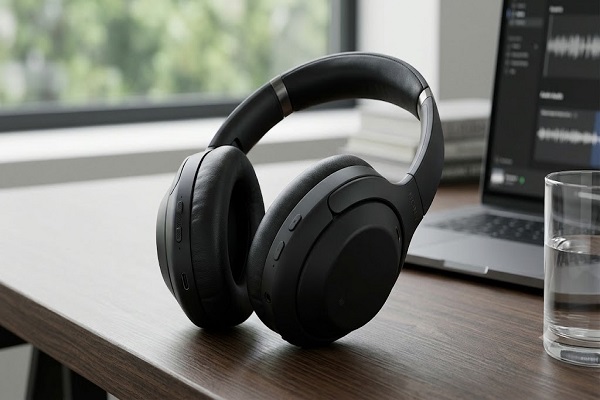
USB-C earphones are a convenient option for smartphones and tablets that do not have a traditional 3.5mm headphone jack.
They connect directly through the USB-C port and can eliminate the need for a separate audio adapter. Depending on the model, they may offer an integrated microphone, in-line controls and noise-isolating designs.
Users should check compatibility with their devices because USB-C audio support can vary between products.
7. USB-C Flash Drive
A USB-C flash drive is a practical accessory for storing and transferring documents, photographs, videos and other files.
It can be used with compatible smartphones, tablets and computers, making it easier to move files without relying entirely on cloud storage.
Some models feature dual connectors, such as USB-C and USB-A, allowing users to transfer data between newer and older devices.
Storage capacity and data transfer speed are important factors to consider before buying one.
8. USB-C Card Reader
A USB-C card reader is useful for photographers, videographers and content creators who regularly transfer files from memory cards.
It allows users to connect compatible SD and microSD cards to laptops, tablets and smartphones. This can make transferring photographs and videos faster and more convenient.
For professional use, check the supported memory card formats and transfer speeds before purchasing a card reader.
9. USB-C Wireless Charging Accessories
Some wireless charging stands and charging pads use USB-C as their power input. These accessories can help reduce cable clutter while charging compatible smartphones, earbuds and other devices.
Wireless charging standards such as Qi and Qi2 support compatible products, but charging performance depends on the device, charger and power adapter.
A wireless charging stand can be especially convenient for keeping a smartphone visible while working at a desk.
10. USB-C to USB-A Adapter
A USB-C to USB-A adapter helps connect older USB accessories to newer devices that have USB-C ports.
It can be used with traditional pen drives, keyboards, mice, card readers and other compatible USB-A devices.
This small accessory is particularly useful for people who have upgraded their smartphones or laptops but still use older peripherals.
11. USB-C Docking Station
A USB-C docking station is a more advanced connectivity solution for professionals and people who use laptops as their primary work computers.
Depending on the model, it can provide multiple USB ports, HDMI or DisplayPort connections, Ethernet, audio connectivity and laptop charging through one connection.
It is particularly helpful for creating a permanent desk setup with external monitors, keyboards, mice and other accessories.
However, users should check their laptop's supported USB-C capabilities and docking station compatibility before buying.
12. USB-C OTG Adapter
A USB-C On-The-Go (OTG) adapter allows compatible smartphones and tablets to connect directly to USB accessories.
Users can connect a pen drive, keyboard, mouse or certain other peripherals without needing a computer.
It can be useful for transferring files, editing documents and accessing stored information while travelling. Device-level OTG support should be checked before purchasing.
Things to Consider Before Buying USB-C Accessories
Although USB-C provides a common connector, accessories do not necessarily offer identical features. Consider the following factors before making a purchase:
Device compatibility: Check whether the accessory supports your smartphone, tablet or laptop.
Charging capacity: Select a charger or cable with suitable power output for your device.
Data transfer speed: Look for the supported USB standard if you frequently transfer large files.
Build quality: Choose durable cables and accessories from reliable manufacturers.
Safety features: Prefer products with appropriate electrical protection and recognised safety certifications.
Port requirements: Consider the number and type of ports needed for your daily activities.
Warranty and brand reputation: Check the manufacturer's warranty and customer support.
Conclusion
USB-C accessories have become important tools for everyday digital life. From fast chargers and power banks to USB-C hubs, flash drives and docking stations, these products can improve convenience, connectivity and productivity.
The best accessories depend on individual requirements and device compatibility. Students may benefit from flash drives and OTG adapters, while office professionals may find USB-C hubs and docking stations more useful. Travellers can consider compact chargers and power banks for convenient charging on the go.
Choosing reliable, compatible USB-C accessories can help users get more value from their electronic devices while making everyday technology easier to use.